 Goagamesonline.org

Goa Games at a glance
| Order of a first visit | Register, then Login |
|---|---|
| Where it all happens | Your browser |
| What joining asks for | Mobile number, password twice, invite code |
| Phone code needed to join | No |
| Order checked on | 8 October 2026 |
First: open the register form
Begin with the Register button on this site. A referral link opens the Goa Games form in your browser, with nothing to install. Have your mobile number and an invite code ready before it loads, since the form asks for both and does not label the code optional.
Second: fill four boxes
- The mobile number comes first, typed in after +91 India.
- Set password takes a password chosen fresh for this account.
- Confirm password takes it again, typed identically.
- The last box holds your invite code.
Because the form has no OTP box, you can finish all four without stopping to check your messages.
Third: sign in
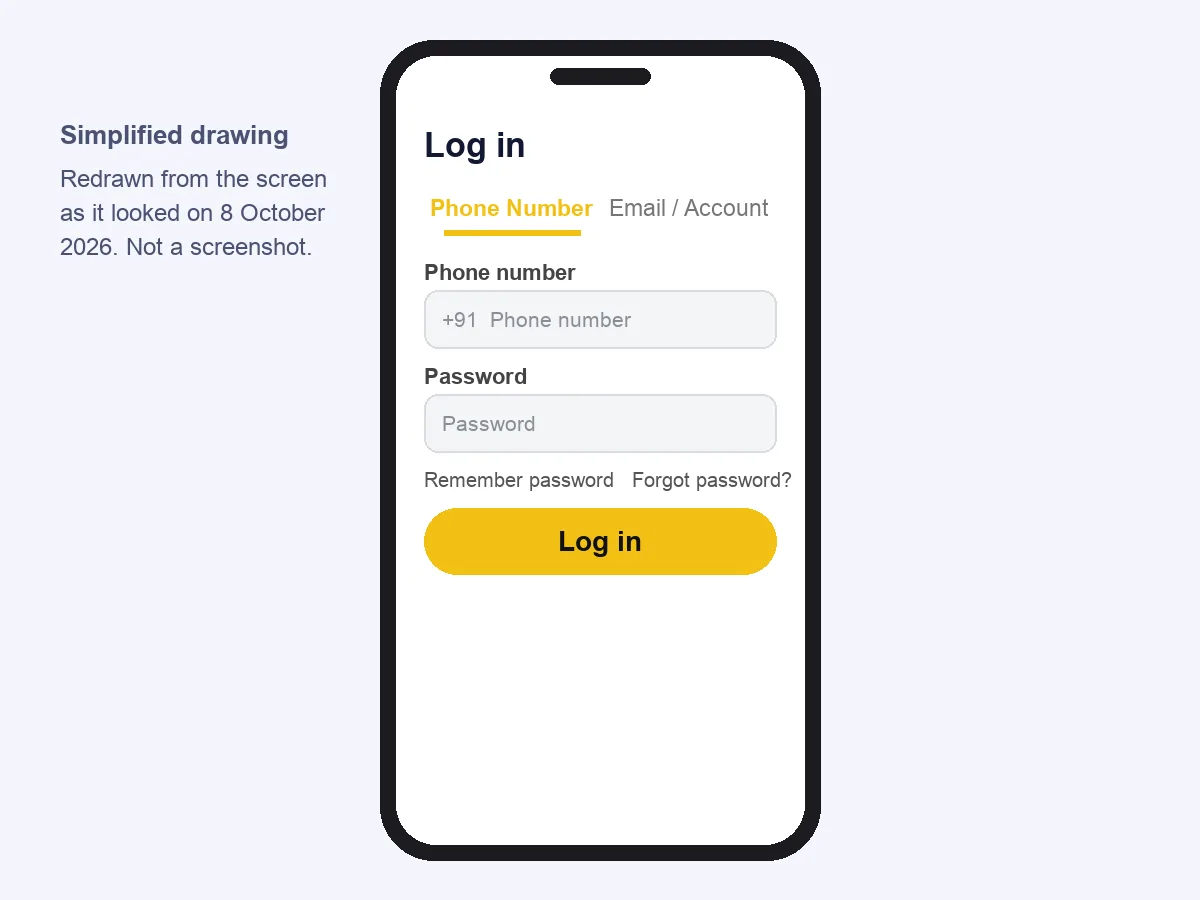
- From this site again, the button for step three is Login.
- Stay on Phone Number and type the mobile number from the form.
- Follow it with the password you set in step two.
- Only a phone that nobody else touches should get a tick in Remember password.
The other tab, Email / Account, is there if your account signs in another way.
Fourth: look around, carefully
Our notes stop at the sign-in, so this page does not describe what comes next. Read each goa games screen before you tap anything on it, and take your time on a first visit.
Later: if the password goes missing
For a forgotten password, the sign-in has a reset link marked Forgot password?
Should that not work, the screen's printed advice is to ask customer service for help with a forgotten password; follow the platform's screens for how to reach them.
Online does not mean always on
A browser tab can stay open all day, but you do not have to leave it that way. Close it when you are done, and on a shared phone check that no password was saved. Coming back later means one more sign-in, which is a small price for keeping the account private.
Always: a limit you chose
Online play has no closing time unless you set one. Choose yours, and an amount, before the first visit. Keep both the same for a few weeks before changing anything, so you can see how they work in practice.
Goa Games Online, in the Order You Will Need It: common questions
Do I need to download anything for goa games online?
This site offers nothing to download, and none is needed, because the screens load in your browser.
What order should a first visit follow?
Register first, then sign in with Login, then look around.
Which tab should I use straight after registering?
Phone Number, with the mobile number you just entered.
What should I have ready before the register form loads?
The mobile number you want on the account, a password you have not used before, and your invite code.
गोवा गेम्स ऑनलाइन: क्रम से
पहले Register से चार बॉक्स वाला फ़ॉर्म भरें, फिर Login से Phone Number टैब में वही नंबर डालें। सब कुछ ब्राउज़र में होता है, कुछ इंस्टॉल नहीं करना पड़ता।
Platform details as seen on 8 October 2026. Updated 28 November 2026.